How to implement technical SEO to improve your search rankings: an 8-step checklist (2026)
Fewer than half of mobile sites pass Core Web Vitals. Here's how to implement technical SEO in 8 steps, following Google's own recommendations.
By Paulina · SEO and digital strategy specialist
· 4 min read
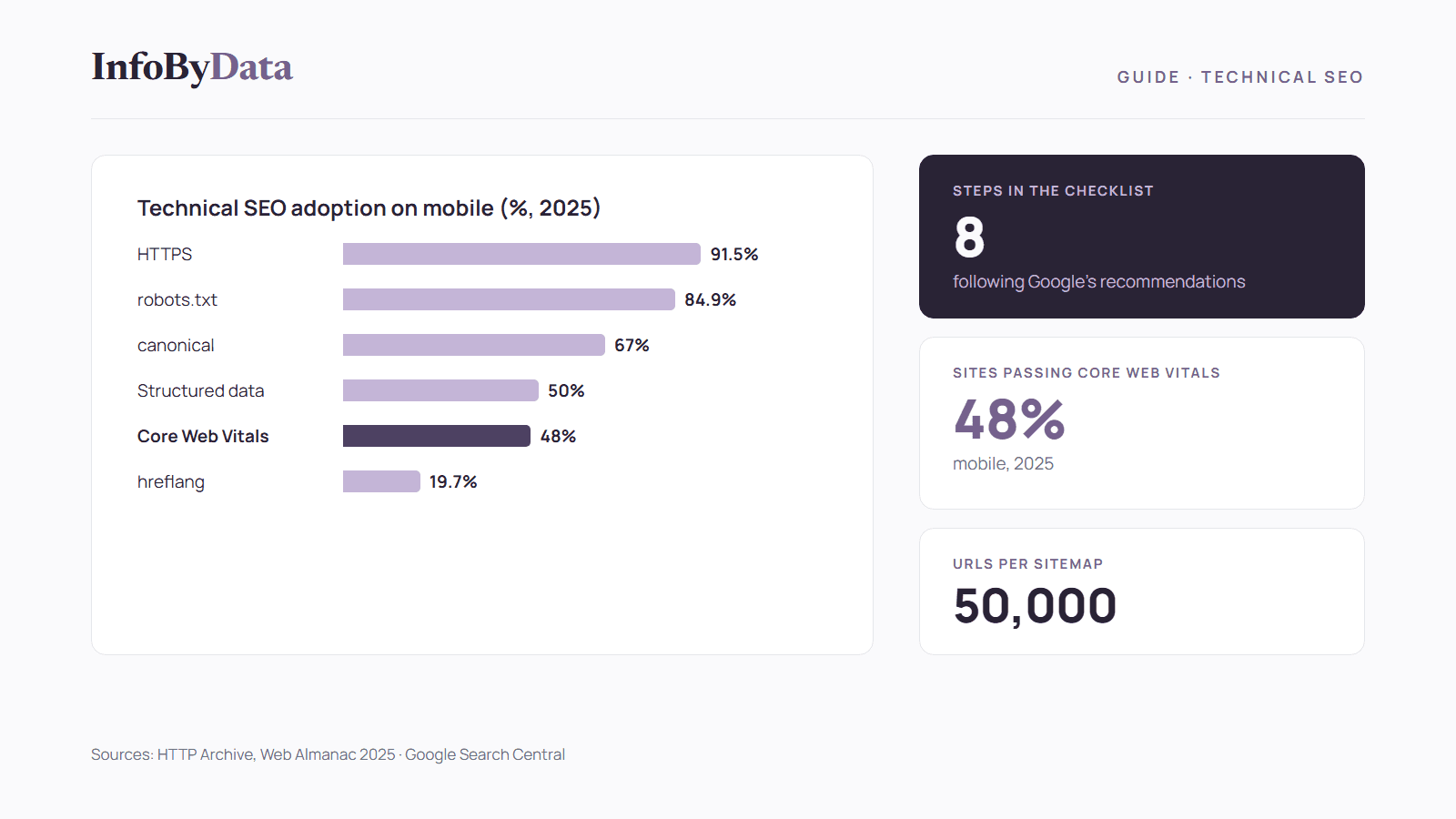
Only 48% of mobile sites pass all three Core Web Vitals, and only half of all pages use structured data, according to the SEO chapter of the Web Almanac 2025 by HTTP Archive. These are gaps you can close: implementing technical SEO means making sure Google can crawl, understand and index your site, and it's the foundation for better search rankings.
This guide is a practical 8-step checklist based on Google's official documentation. For the full data on the state of the web, see our study technical SEO in numbers.
91.5%
Mobile pages using HTTPS
the basics are widespread
84.9%
Sites with a valid robots.txt
mobile
67%
Pages with a canonical tag
up from 65% in 2024
48%
Mobile sites passing Core Web Vitals
the big gap
Source: HTTP Archive, Web Almanac 2025
View the data as a table
| Mobile pages using HTTPS | 91.5% | the basics are widespread |
| Sites with a valid robots.txt | 84.9% | mobile |
| Pages with a canonical tag | 67% | up from 65% in 2024 |
| Mobile sites passing Core Web Vitals | 48% | the big gap |
What implementing technical SEO means
Technical SEO is the part of search optimization you don't see: site security, the files that guide search engines, speed, the mobile version and how URLs are organized. If it fails, even the best content may not show up on Google. While on-page SEO works on each page, technical SEO works on the whole site.
Before you start: the diagnosis
Connect your site to Google Search Console. There you'll see which pages are indexed, which have problems, the Core Web Vitals report and the searches that bring you visitors. It's free and it's the starting point for implementing technical SEO with data.
Checklist to implement technical SEO in 8 steps
This is where the web stands today on each item in this checklist:
Step 1: use HTTPS across the whole site
91.5% of mobile pages already use HTTPS. If your site still doesn't, this is the first task: it protects your visitors' data and avoids "not secure" warnings in browsers.
Step 2: configure robots.txt correctly
According to Google, robots.txt tells crawlers which URLs they can access, and it's mainly used to manage bot traffic to your server. But it's not a way to keep a page out of Google: for that, use the noindex directive or password-protect the page. In robots.txt you can also decide what to do with AI bots, as we explain in technical SEO in numbers.
Step 3: create and submit an XML sitemap
A sitemap is a file that lists your site's pages. According to Google's guide:
- Each sitemap can hold up to 50,000 URLs or 50 MB uncompressed.
- It's best to publish it at the site root.
- You can submit it in Search Console's Sitemaps report or add a
Sitemap:line to your robots.txt.
Google notes that a sitemap doesn't guarantee that every page will be crawled and indexed, and that small, well-linked sites of about 500 pages or fewer may not need one.
Step 4: set the canonical URL for each page
When the same content appears at several URLs, you need to tell Google which one is the main one. According to its documentation, the strongest signals are permanent redirects and the rel="canonical" tag; including a URL in the sitemap is a weaker signal. Google recommends a self-referencing canonical tag on each canonical page.
Step 5: make sure the mobile version is complete
Google uses the mobile version of your site for indexing and ranking, according to its mobile-first indexing guide. If your mobile content is thinner than your desktop content, only what appears on mobile counts.
Step 6: improve Core Web Vitals
The three metrics and their "good" thresholds are: LCP (loading) of 2.5 seconds or less, INP (responsiveness) of 200 milliseconds or less and CLS (stability) of 0.1 or less, according to web.dev. On mobile, loading is the metric most sites fail: optimize images, reduce render-blocking code and choose a good host.
Step 7: add structured data
Half of all pages still don't use structured data. It helps Google understand what each page is and enables rich results, such as a product's price and availability. If you run a store, see our guide to SEO for online stores.
Step 8: if your site is multilingual, use hreflang
Only 19.7% of pages declare their other-language versions with hreflang. If you publish in several languages, as InfoByData does in Spanish, English and Portuguese, hreflang tells Google which version to show each user.
Common mistakes when implementing technical SEO
- Blocking a page in robots.txt to remove it from Google. Google won't crawl it, but the URL can still appear in results. To remove it, use
noindex. - Having several versions of a page without a canonical. Google will have to choose which one to show on its own.
- Hiding content in the mobile version. Since Google indexes the mobile version, that content stops counting.
- Submitting a sitemap and forgetting about it. Check in Search Console whether Google processed it without errors.
How to measure whether technical SEO is improving your rankings
- Check indexing in Search Console: how many pages are indexed and what errors there are.
- Follow the Core Web Vitals report after each speed improvement.
- Compare clicks and impressions before and after each change, and cross-check with your web analytics.
- Watch your competitors: the tools in our guide to monitoring competitors show whether you're gaining or losing positions.
What it means for you
- Implementing technical SEO is the foundation of search rankings: without proper crawling and indexing, content doesn't show up on Google.
- Mobile speed is the biggest opportunity: more than half of mobile sites fail Core Web Vitals.
- You don't have to do everything at once: follow the checklist in order and measure each change in Search Console.
Sources
- HTTP Archive: Web Almanac 2025, SEO chapter
- Google Search Central: introduction to robots.txt
- Google Search Central: build and submit a sitemap
- Google Search Central: what is a sitemap
- Google Search Central: consolidate duplicate URLs
- Google Search Central: mobile-first indexing
- web.dev: defining the Core Web Vitals thresholds
- implement technical SEO
- technical SEO
- search rankings
- Core Web Vitals
- SEO checklist