AI tools for graphic design and logo creation: a 2026 comparison and what to know before using them
Canva has over 250 million monthly users and Adobe Firefly is trained on licensed content. We compare AI tools for graphic design and logo creation, with data.
By Paulina · SEO and digital strategy specialist
· 5 min read
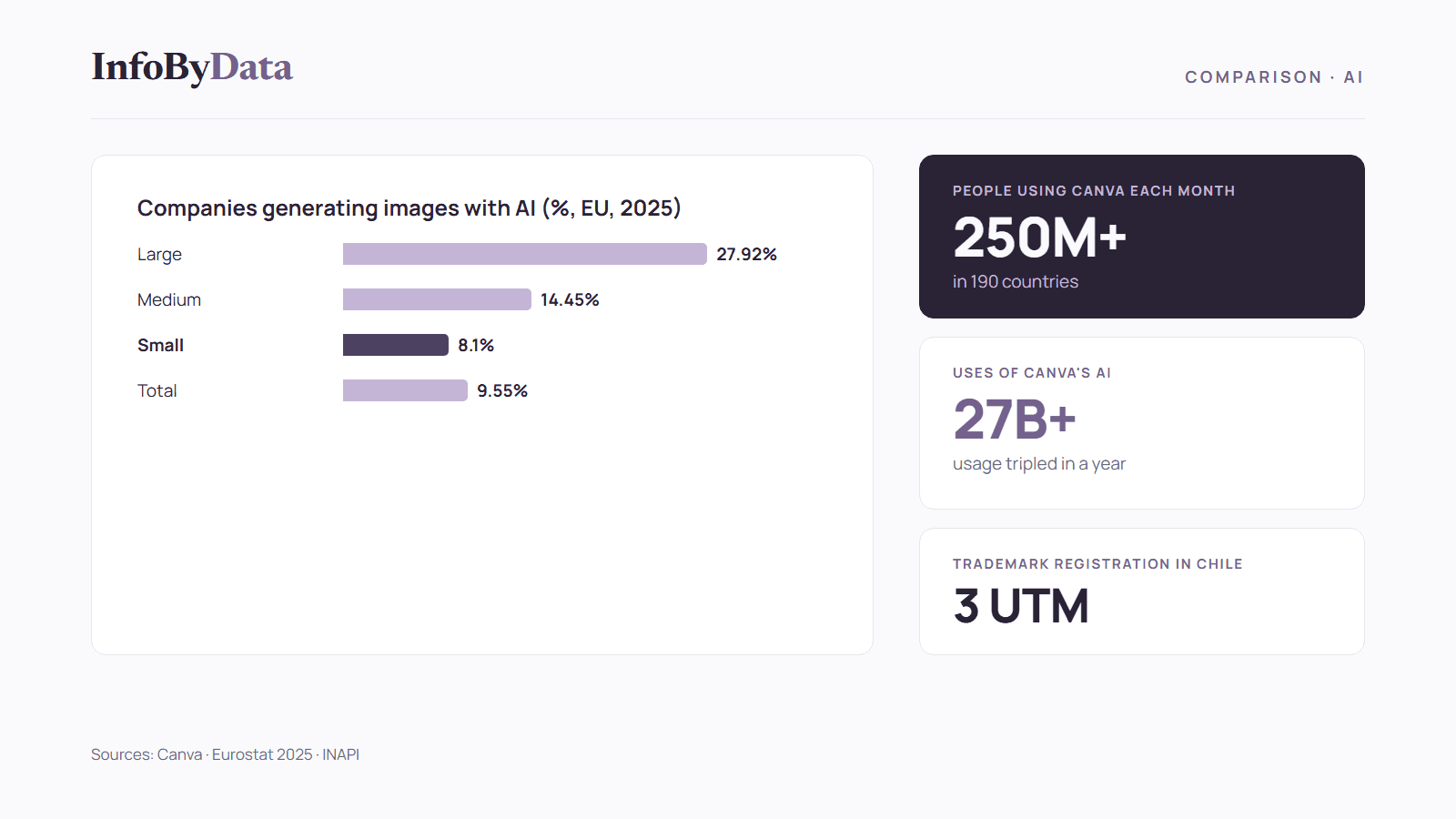
More than 250 million people use Canva every month in 190 countries, and its artificial intelligence products have been used more than 27 billion times, according to Canva. Among European companies, 9.55% already use AI to generate images, video or audio, according to Eurostat. AI tools for graphic design have gone from a curiosity to an everyday work tool.
In this comparison we review the main options for creating graphics and logos, and what you need to know about copyright, usage licenses and trademark registration in Chile. We have no commercial relationship with any of the companies mentioned.
250M+
People using Canva each month
in 190 countries
27B+
Uses of Canva's AI products
usage tripled in a year
90M
Monthly users of Adobe's free creative apps
up from 50M a year earlier
9.55%
European companies generating images with AI
2025
Source: Canva, 2026; Adobe, June 2026; Eurostat, 2025
View the data as a table
| People using Canva each month | 250M+ | in 190 countries |
| Uses of Canva's AI products | 27B+ | usage tripled in a year |
| Monthly users of Adobe's free creative apps | 90M | up from 50M a year earlier |
| European companies generating images with AI | 9.55% | 2025 |
What AI tools for graphic design can do
These tools create images, illustrations, vectors and text from a written prompt, and they also edit existing designs: they remove backgrounds, change colors, adapt a piece to different formats or suggest fonts. For a small business, they make it possible to produce content for social media, presentations or an online store without hiring a designer for every piece.
Large companies use them far more than small ones:
The main AI tools for graphic design and logo creation
Canva: design for everyone with built-in AI
It's the most widely used design platform: more than 250 million people a month, according to Canva, which says it is the third most used AI product in the world. It has a free logo maker and AI tools to generate images, edit photos and adapt designs to different formats.
Best for: small businesses and entrepreneurs who need lots of pieces for social media and marketing.
Adobe Firefly: commercially safe AI
According to Adobe, Firefly models are "commercially safe" because they are "trained on licensed content from Adobe Stock and public domain content where copyright has expired." It creates high-resolution images, vector graphics, video and sound, and has a free plan with limited daily generations. Adobe's free creative apps reached 90 million monthly users, up from 50 million a year earlier, according to its June 2026 earnings call.
Best for: designers and agencies that need commercial use with less legal risk.
ChatGPT Images: design from the conversation
According to OpenAI's help pages, ChatGPT Images is available on all tiers, can add text to images, make the background transparent and offers templates for creating posters or logos.
Best for: people who already use ChatGPT and want quick sketches of ideas.
Microsoft Designer: free, but for personal use only
According to Microsoft's FAQ, Designer is free, but it is licensed for personal, non-commercial use with a Microsoft account. It's useful for testing ideas, but not for creating a company's final logo.
Best for: personal projects and proofs of concept.
Comparing AI tools for graphic design
| Tool | Company | Stands out for | Free option | Commercial use |
|---|---|---|---|---|
| Canva | Canva | Templates, social media and a logo maker | Yes | Check the license of each element |
| Adobe Firefly | Adobe | Images and vectors trained on licensed content | Yes, with limited daily generations | Adobe says it is commercially safe |
| ChatGPT Images | OpenAI | Sketches, text in images and transparent backgrounds | Yes, on all tiers | Check OpenAI's terms |
| Microsoft Designer | Microsoft | Quick designs and brand kits | Yes | No: personal, non-commercial license |
Terms change often: check each tool's current terms before using a design in your business.
Logo creation with AI: what you need to know
A logo made only with AI may not be protected by copyright
The US Copyright Office concluded in January 2025 that generative AI outputs "can be protected by copyright only where a human author has determined sufficient expressive elements," "but not the mere provision of prompts," according to its report on copyright and AI. It's a relevant international reference: a logo created from a prompt alone may end up unprotected. The practical advice is to use AI to explore ideas and then modify and finish the design by hand.
In Chile, a logo is protected as a registered trademark
To protect a logo as a trademark in Chile, you register it with INAPI, the national industrial property institute. According to INAPI:
- The application is filed online, with the brand's logo attached.
- It costs 3 UTM per class: 1 UTM when you file and 2 UTM if it's accepted.
- The registration lasts 10 years from the date it's granted.
Before choosing an AI-made logo, check that it doesn't resemble a trademark that's already registered.
Check each tool's usage license
Not all of them allow commercial use. Microsoft Designer, for example, has a personal, non-commercial license. Adobe, by contrast, says Firefly is commercially safe.
How to create a logo with AI, step by step
Step 1: define your brand before opening the tool
Write one sentence about what your business does, who it sells to and the feeling you want to convey. That text will be your prompt.
Step 2: generate several options
Use one or two AI tools for graphic design to explore styles, colors and fonts. Ask for variations and don't settle for the first one.
Step 3: refine the design by hand
Simplify the shape, adjust colors and fonts, and test the logo at a small size and in black and white. This human work also helps protect the design.
Step 4: check that it doesn't resemble another brand
Search for similar trademarks in INAPI's database before using it in your business.
Step 5: register your trademark
File the application online with INAPI using the final logo.
What it means for you
- AI tools for graphic design are now within reach of any small business: Canva, Adobe Firefly and ChatGPT have free options to get started.
- For a logo, AI is the starting point, not the finish: a design created from prompts alone may not be protected by copyright. Finish it by hand.
- Check the license and register your trademark: not every tool allows commercial use, and in Chile a logo is protected by registering it with INAPI.
To use these pieces in your marketing, see also our articles on e-commerce in numbers, the comparison of AI virtual assistants and our guide to artificial intelligence for SMEs in Chile.
Sources
- Canva: "The next era of Canva" (2026)
- Canva: logo maker
- Adobe: Firefly
- Adobe: Q2 fiscal 2026 earnings call transcript (June 11, 2026)
- OpenAI: images in ChatGPT
- Microsoft: Microsoft Designer FAQ
- US Copyright Office: NewsNet 1060 (January 29, 2025)
- INAPI: trademark FAQ (in Spanish)
- Eurostat: "Artificial intelligence by size class of enterprise" (isoc_eb_ai), 2025 data
- AI tools for graphic design
- logo creation
- Canva
- Adobe Firefly
- AI logo