AI Checker: what are the benefits of analyzing your website to appear in ChatGPT, Gemini and Perplexity
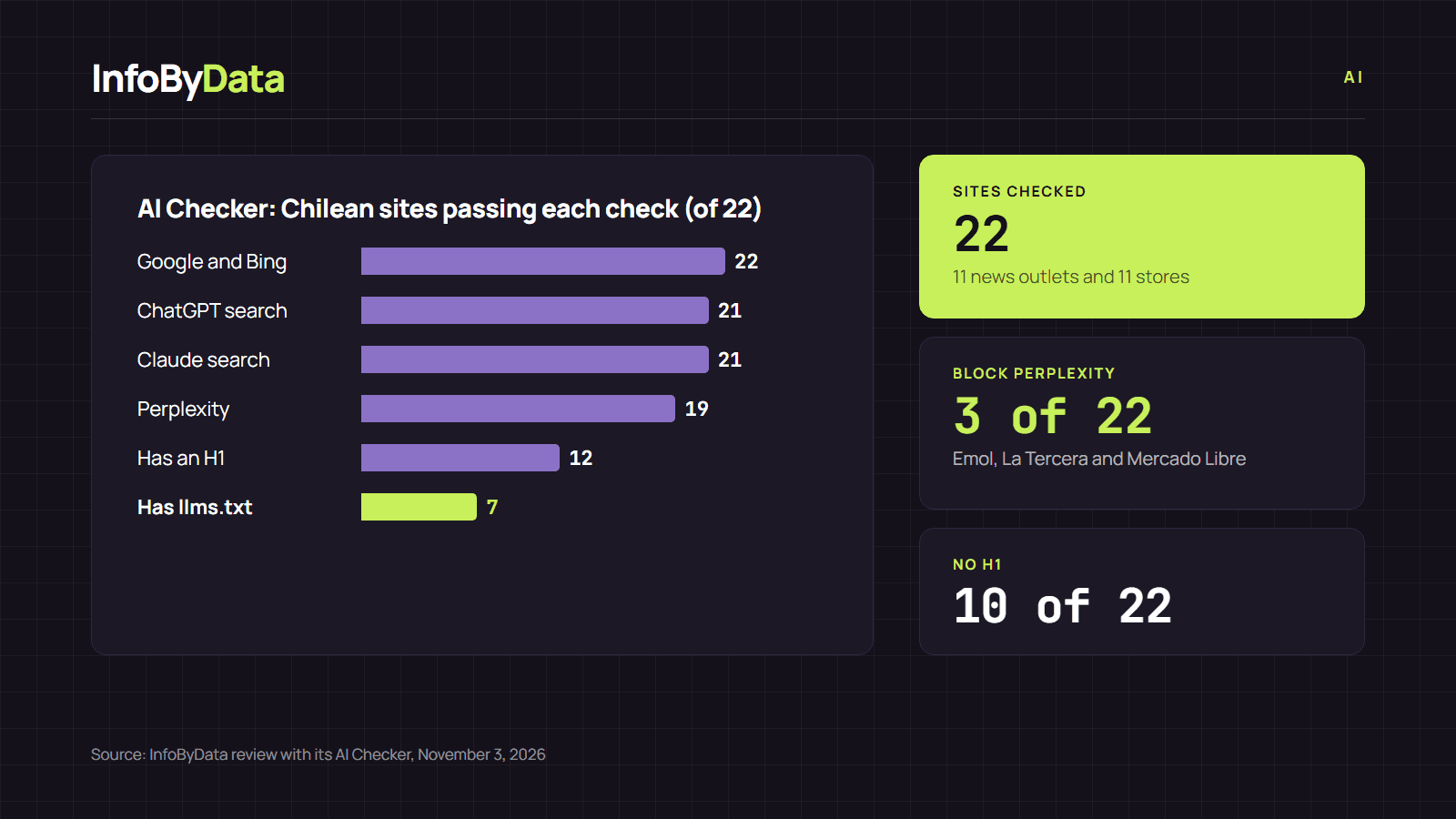
We ran 22 Chilean websites through our AI Checker. Google and Bing can read all of them, but 3 block Perplexity and only 7 have an llms.txt file in place.
· 7 min read
More and more people look for information by asking ChatGPT, Gemini, Perplexity or Claude, and those answers cite web pages. For your site to show up there, the crawlers of those services first need to be able to read it. The InfoByData AI Checker checks exactly that: paste a URL and in seconds it tells you which AI crawlers can access it, what is missing and what is worth fixing.
To show its benefits, on November 3, 2026 we ran the home pages of 22 Chilean websites through the AI Checker: 11 news outlets and 11 online stores. The results show that, while nobody blocks Google, some large sites are shutting out AI assistants, some of them perhaps without knowing it.
22 of 22
Sites Google and Bing can read
none asks not to be indexed
3 of 22
Block Perplexity
Emol, La Tercera and Mercado Libre
7 of 22
Have an llms.txt file
a new, optional signal
Source: InfoByData review with its AI Checker, November 3, 2026
View the data as a table
| Sites Google and Bing can read | 22 of 22 | none asks not to be indexed |
| Block Perplexity | 3 of 22 | Emol, La Tercera and Mercado Libre |
| Have an llms.txt file | 7 of 22 | a new, optional signal |
What the AI Checker reviews
The AI Checker reads three public things on your site: the robots.txt file, the llms.txt file (if there is one) and the page HTML. With that, it delivers a review in three blocks:
| Block | What it checks | Why it matters |
|---|---|---|
| AI crawlers | Whether 15 crawlers, such as OAI-SearchBot, Claude-SearchBot, PerplexityBot, Googlebot, Bingbot or GPTBot, can access the page | If a search crawler is blocked, that service cannot cite your page |
| Indexing | Whether the page asks not to be indexed (noindex) or not to show snippets (nosnippet) | Those tags also remove the page from AI answers |
| Content and signals | Text without JavaScript, H1 and H2, structured data, author, date, sitemap and llms.txt | They help assistants understand what the page is about and who wrote it |
The AI Checker does not pretend to be any crawler, and it does not detect whether a text was written with AI: it checks a page's AI visibility.
Benefits of analyzing your website with the AI Checker
1. You discover blocks you didn't know you had. Many robots.txt files were written years ago or generated by a plugin. A rule meant for one crawler can end up blocking another. The AI Checker shows, crawler by crawler, the exact rule that allows or blocks it.
2. You separate search from training. AI companies use different crawlers for each task. According to OpenAI's documentation, OAI-SearchBot is used to show websites in ChatGPT search, while GPTBot collects content to train its models, and each can be allowed or blocked separately. Anthropic does the same with Claude-SearchBot and ClaudeBot. That way you can choose to appear in answers without handing over your content for training.
3. You avoid costly mistakes with Google. Google states that blocking Google-Extended does not affect a site's inclusion in Search or its ranking. Blocking Googlebot, on the other hand, removes the page from Google and also from AI Overviews and AI Mode. The AI Checker tells the two cases apart.
4. You see what crawlers read, not what you see. Several AI crawlers do not run JavaScript. If your page builds its text in the browser, the crawler may get an almost empty page. The AI Checker counts how many words the server delivers without JavaScript.
5. You check in seconds, for free. You don't need to install anything or create an account, so you can repeat the check after every change to your site.
What we found on 22 Chilean websites with the AI Checker
The most relevant findings:
- La Tercera blocks all three AI search crawlers we checked (OAI-SearchBot, Claude-SearchBot and PerplexityBot), but lets Googlebot and Bingbot in. In other words, it can appear on Google and Copilot, but not in ChatGPT, Claude or Perplexity search.
- Emol and Mercado Libre block PerplexityBot and the GPTBot and ClaudeBot training crawlers. Emol also blocks Google-Extended and Applebot, Apple's crawler.
- Only 7 of 22 sites have llms.txt: Cooperativa, DF, Jumbo, Líder, Meganoticias, PC Factory and Sodimac. It is a new, optional file that summarizes the site for language models; it is not an official standard yet.
- Four stores deliver little text without JavaScript: Líder (211 words), cyber.cl (247), PC Factory (428) and Falabella (470). What a crawler that doesn't run JavaScript can read from their home pages is limited.
- 10 of 22 pages have no H1 in the HTML the server delivers, and four sites have no structured data (cyber.cl, Emol, Jumbo and PC Factory). Sodimac has structured data blocks with errors.
- Authors show up far more on news sites than on stores: 9 of the 11 outlets declare one on their home page, versus 2 of the 11 stores (Easy and PC Factory).
| Site | ChatGPT (search) | Claude (search) | Perplexity | GPTBot (training) | llms.txt | Words without JS |
|---|---|---|---|---|---|---|
| 24horas | Yes | Yes | Yes | Yes | No | 3267 |
| ADN Radio | Yes | Yes | Yes | Yes | No | 2469 |
| BioBioChile | Yes | Yes | Yes | Yes | No | 6132 |
| CNN Chile | Yes | Yes | Yes | Yes | No | 1058 |
| Cooperativa | Yes | Yes | Yes | Yes | Yes | 2264 |
| DF | Yes | Yes | Yes | Yes | Yes | 5443 |
| El Mostrador | Yes | Yes | Yes | Yes | No | 1899 |
| Emol | Yes | Yes | No | No | No | 1137 |
| La Tercera | No | No | No | No | No | 2979 |
| Meganoticias | Yes | Yes | Yes | Yes | Yes | 2013 |
| T13 | Yes | Yes | Yes | Yes | No | 1615 |
| abc | Yes | Yes | Yes | Yes | No | 3391 |
| cyber.cl | Yes | Yes | Yes | Yes | No | 247 |
| Easy | Yes | Yes | Yes | Yes | No | 3413 |
| Falabella | Yes | Yes | Yes | Yes | No | 470 |
| Hites | Yes | Yes | Yes | Yes | No | 9755 |
| Jumbo | Yes | Yes | Yes | Yes | Yes | 2886 |
| Líder | Yes | Yes | Yes | Yes | Yes | 211 |
| Mercado Libre | Yes | Yes | No | No | No | 1073 |
| Paris | Yes | Yes | Yes | Yes | No | 6177 |
| PC Factory | Yes | Yes | Yes | Yes | Yes | 428 |
| Sodimac | Yes | Yes | Yes | Yes | Yes | 5009 |
Ripley is not included in the review: its site responded with a block (403 error) to the automated check, as already happened with our SEO Checker. Blocking a crawler can be a legitimate decision by a site; the AI Checker simply shows the status so that decision is a conscious one.
How to use the free AI Checker in 3 steps
- Go to the free AI Checker and paste the URL of the page you want to check, for example your home page, an article or your best-selling product.
- Look at the search crawlers first (ChatGPT, Claude, Google, Perplexity and Copilot): if any is blocked, that service won't be able to cite your page. Then review the content signals.
- Fix your robots.txt or your HTML and check again. If you use a CMS such as WordPress, also review your SEO or security plugins, which sometimes edit robots.txt.
Appearing in AI answers is now part of the digital strategy for AI in business. To understand the impact on traffic, see our analysis of AI Overviews in figures and the study on which Chilean companies appear in AI answers.
What it means for you
- If you have a website: run your home page and key pages through the AI Checker; a block in robots.txt can leave you out of ChatGPT or Perplexity without you noticing.
- If you want to protect your content: you can block training crawlers (GPTBot, ClaudeBot, Google-Extended) and keep search crawlers open, so you keep appearing in answers.
- If your site relies on JavaScript: check how much text the server delivers; if it's little, AI crawlers may not understand what your page is about.
Sources
- AI Checker
- AI visibility
- robots.txt
- llms.txt
- ChatGPT
- Perplexity