Google updates in 2026: how they affect rankings and what to do with your site's SEO
Google confirmed 7 ranking updates in 2026, removed FAQ rich results and added a new spam policy. Here is what changed and how to protect your site's SEO.
· 4 min read
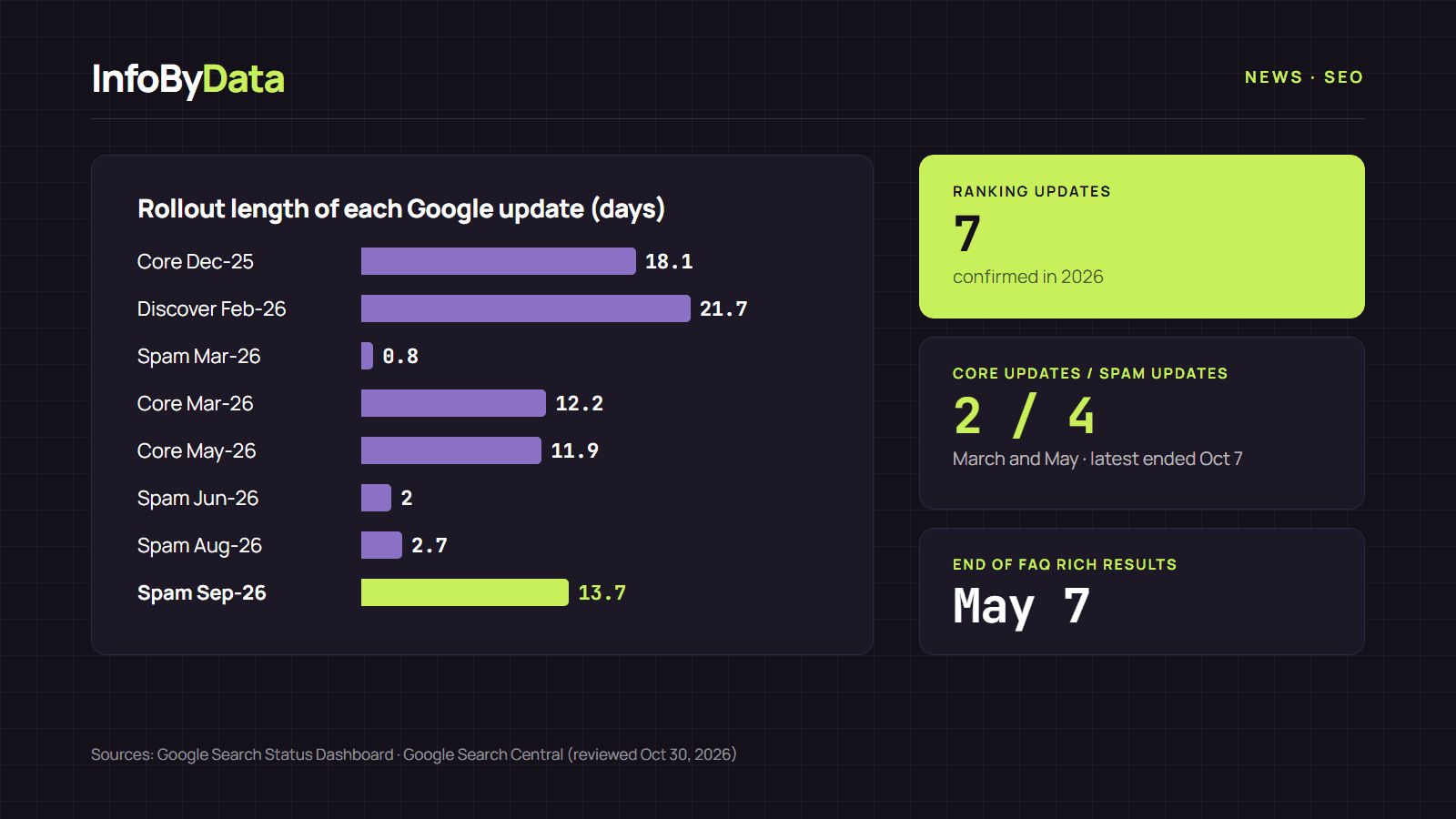
Google updates did not slow down in 2026: the search engine confirmed seven ranking updates between January and October (two core updates, four spam updates and one Discover update), according to its official Search Status Dashboard. On top of that came documentation changes that also affect how sites look in the results, such as the end of FAQ rich results.
7
Confirmed ranking updates
January to October 2026
2
Core updates
March and May
4
Spam updates
the latest ended on October 7
Source: Google Search Status Dashboard and Google Search Central, reviewed on October 30, 2026
View the data as a table
| Confirmed ranking updates | 7 | January to October 2026 |
| Core updates | 2 | March and May |
| Spam updates | 4 | the latest ended on October 7 |
The calendar of Google updates in 2026
| Update | Start | End | What it affects |
|---|---|---|---|
| February Discover update | February 5 | February 26 | Which articles appear in Google Discover |
| March spam update | March 24 | March 25 | Sites that break the spam policies |
| March core update | March 27 | April 8 | Overall Search rankings |
| May core update | May 21 | June 1 | Overall Search rankings |
| June spam update | June 24 | June 26 | Sites that break the spam policies |
| August spam update | August 18 | August 20 | Sites that break the spam policies |
| September spam update | September 24 | October 7 | Sites that break the spam policies |
While an update rolls out, positions can shift from day to day, so it helps to know how long each one took:
The other changes that move rankings
Not everything arrives as an "update". In 2026 Google also changed rules and features that affect visibility, according to its official documentation changelog:
- Goodbye to FAQ rich results (May 7): FAQs marked up with structured data stopped appearing in Search. Pages do not lose position because of this, but they do lose the extra space they took up in the result.
- New policy against "back button hijacking" (April 13): Google added it to the malicious practices in its spam policies. It happens when a site manipulates the browser history to stop people from going back to the page they came from.
- Spam policies also apply to AI answers (May 15): Google clarified that they apply to generative AI features in Search, such as AI Overviews and AI Mode.
- Preferred sources in AI Overviews and AI Mode (May 27): users can mark outlets or sites as preferred, and this now also shapes AI answers.
- Updated site reputation policy (August 28): it targets sections with third-party content that exploit a domain's authority.
For AI answers, Google says in its official guide that there are no special requirements: the page only needs to be indexed and eligible to show with a snippet. We look at how many clicks these answers take away in AI Overviews in numbers.
How Google updates affect your site
Each type of update works differently:
- Core updates: according to Google, they "don't target specific sites or individual web pages." They reorder results based on how useful and high-quality content is, so a drop does not mean a penalty. Most sites, Google says, notice no change.
- Spam updates: these do target sites that break the policies, such as scaled content abuse, paid links or repurposed expired domains.
- Discover update: it only changes traffic from Google Discover, not positions in Search.
How to deal with Google updates through your site's SEO
These are the steps Google recommends in its official guide on core updates, plus a basic technical review:
- Confirm the rollout has finished on the status dashboard. Until then, the data is still moving.
- Wait at least a full week after it ends and compare it with the week before it started, in the Search Console performance report.
- Measure the size of the drop. If it is small, Google recommends not changing content that already performs well.
- If the drop is large and sustained, review the whole site and the most affected pages with Google's helpful content self-assessment, ideally with people outside the site.
- Avoid quick fixes. Google advises against deleting content or removing elements "because someone said they hurt SEO." Deleting should be a last resort.
- Be patient: some changes show up within days, but Google warns that recognizing a site has improved can take months, sometimes until the next core update.
- Check the technical basics: title, description, headings, canonical, indexing and structured data. You can do it for free with our SEO Checker; in SEO Checker: what SEO errors Chile's online stores have we show what it found on 11 pages.
We go deeper into the technical side in how to implement technical SEO and technical SEO in numbers.
Google releases new updates several times a year, plus smaller unannounced changes. InfoByData will keep tracking the official dashboard and update this report when a new Google update is confirmed.
What it means for you
- If your traffic dropped in 2026: match the dates of the drop against the calendar above before changing anything; if it lines up with a core update, follow Google's steps and wait for it to finish.
- If you used FAQs with structured data: they no longer produce rich results; keep them only if they help the reader.
- If your site uses pop-ups, redirects or ad scripts: make sure none of them stops people from going back with the browser button; since April it is a sanctioned practice.
Sources
- Google, Search Status Dashboard: ranking incident history
- Google Search Central, "Latest Google Search Documentation Updates"
- Google Search Central, "Google Search's core updates and your website"
- Google Search Central, "Spam policies for Google web search"
- Google Search Central, "AI features and your website"
- Google Search Central Blog, "Google's February 2026 Discover Core Update"
- Google updates
- core update
- spam update
- Search Console
- search rankings