Best AI platforms for business data analysis in 2026: a data-backed comparison
Microsoft, Google and Qlik lead analytics in Gartner's 2026 ranking, and ChatGPT, Claude and Gemini now analyze spreadsheets. We compare the best AI platforms.
By Paulina · SEO and digital strategy specialist
· 5 min read
39.85% of European companies analyzed data in 2025, but only 5.1% used machine learning to do it, according to Eurostat. A new generation of tools is closing that gap: the best AI platforms let you ask questions of your data in plain language, without knowing how to code.
In this comparison we look at three groups: the business intelligence (BI) platforms recognized as Leaders by Gartner in 2026, the AI assistants that already analyze spreadsheets, and cloud data platforms. We have no commercial relationship with any of the companies mentioned.
39.85%
EU companies that analyze data
with 10 or more employees, 2025
5.1%
Use machine learning to analyze data
of European companies
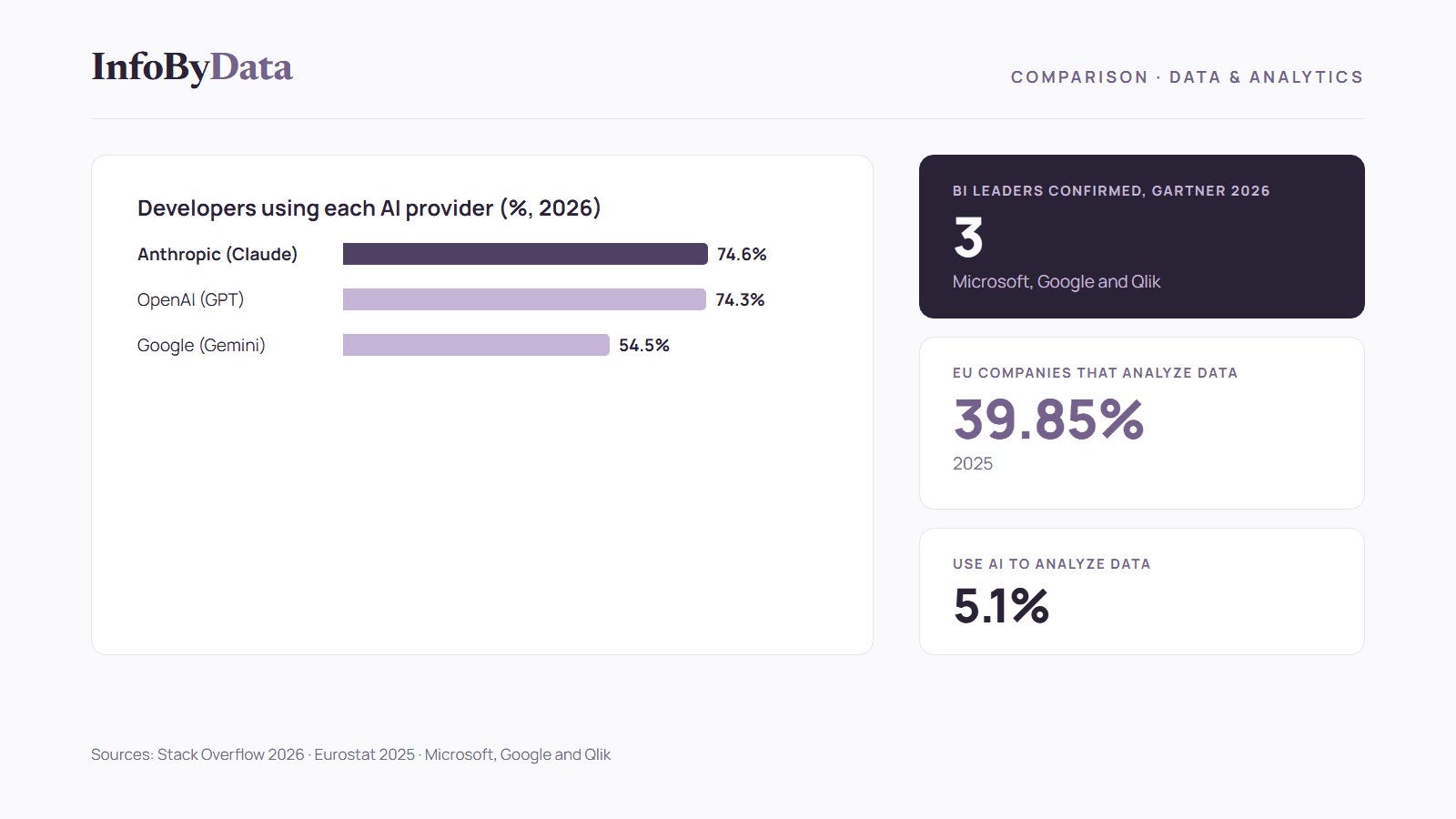
74.6%
Developers using Anthropic models
Stack Overflow survey, 2026
74.3%
Developers using OpenAI models
Stack Overflow survey, 2026
Source: Eurostat, 2025; Stack Overflow Developer Survey 2026
View the data as a table
| EU companies that analyze data | 39.85% | with 10 or more employees, 2025 |
| Use machine learning to analyze data | 5.1% | of European companies |
| Developers using Anthropic models | 74.6% | Stack Overflow survey, 2026 |
| Developers using OpenAI models | 74.3% | Stack Overflow survey, 2026 |
What AI platforms for business data analysis are
They are tools that bring together a company's data (sales, customers, finance, inventory) and use artificial intelligence to summarize it, find patterns and answer questions. The difference from a traditional dashboard is that users can type, for example, "which product sold the most last quarter in the Valparaíso region?" and get the answer with a chart.
AI-powered business data analysis doesn't replace having organized data: it's the next step. We explain this in our 2026 data-driven study, where we saw that large companies analyze data at a much higher rate than small ones.
The best AI platforms for BI according to Gartner 2026
Every year Gartner publishes its Magic Quadrant for analytics and business intelligence platforms. The 2026 edition came out on June 29. These are the platforms whose Leader position we were able to confirm on each company's official site:
Microsoft Power BI and Fabric: AI with Copilot
Microsoft was positioned as a Leader in the 2026 Magic Quadrant, according to its Power BI page. Its Copilot assistant lets you "ask questions about your data or describe the report you need in natural language." It offers a free account, and the Power BI Desktop app can be downloaded at no cost.
Best for: companies that already use Excel and Microsoft 365.
Google Looker: agents with Gemini
Google was recognized as a Leader for the third consecutive year, according to the Google Cloud blog of July 1, 2026. Looker includes Gemini and conversational agents that let users query data models "using plain natural language," as well as assistants that create charts and automatic summaries. It integrates natively with BigQuery.
Best for: companies that work with Google Cloud or Google Workspace.
Qlik: analytics with sustained recognition
Qlik reports that it continues to be recognized by Gartner as a Leader in the 2026 edition. It's a platform with a long track record in business data analysis and a cloud offering.
Best for: medium and large companies with multiple data sources.
A Magic Quadrant evaluates each vendor's ability to execute and completeness of vision. It's a useful reference, but it doesn't replace trying the tool with your own data.
AI assistants for business data analysis without coding
For a small business, the fastest way to start isn't a BI platform but an AI assistant it already uses for other tasks. The three main ones analyze data files:
ChatGPT: file analysis with tables and charts
According to the OpenAI Help Center, ChatGPT "can analyze uploaded files, answer questions about the data, and create tables or charts." It accepts spreadsheets such as Excel and CSV files.
Claude: analysis and file creation
According to the Anthropic Help Center, Claude processes CSV files and spreadsheets for analysis and visualization, generates charts and can deliver Excel spreadsheets with formulas and charts.
Gemini in Google Sheets: AI inside the spreadsheet
According to Google's help pages, Gemini in Google Sheets lets you create tables and work with data directly inside the spreadsheet, without exporting it.
These assistants are also the AI models most used by developers, according to Stack Overflow's annual survey:
All three are officially available in Chile, as we detail in our guide to artificial intelligence for SMEs in Chile.
Cloud platforms for business data analysis at scale
As data grows, companies centralize it in a cloud platform that AI tools then work on. These are the ones developers use most:
For a small business, these platforms are usually a second step: they make sense when the data no longer fits in a spreadsheet or comes from many different systems.
Comparison: the best AI platforms for business data analysis
| Platform | Type | What the AI does | To get started |
|---|---|---|---|
| Microsoft Power BI | Business intelligence | Copilot answers questions and builds reports in natural language | Free account and free Power BI Desktop |
| Google Looker | Business intelligence | Gemini agents, charts and automatic summaries | Native integration with BigQuery |
| Qlik | Business intelligence | Cloud analytics | Leader in Gartner 2026 |
| ChatGPT | AI assistant | Analyzes files, creates tables and charts | Upload an Excel or CSV file |
| Claude | AI assistant | Analyzes CSV files and spreadsheets, creates charts and Excel files | Upload an Excel or CSV file |
| Gemini in Sheets | AI in the spreadsheet | Creates tables and works inside Google Sheets | Google Sheets with Gemini |
Features and plans change often. Check the current terms on each company's site before deciding.
How to choose among the best AI platforms
- Start where your data already is. If you use Excel and Microsoft 365, Power BI is the natural path; if you use Google Workspace, Looker or Gemini in Sheets.
- Try an assistant first. Upload a sales spreadsheet to ChatGPT, Claude or Gemini and ask for a summary. It's the cheapest way to learn which questions are useful to you.
- Define your indicators before the tool. AI answers better when you know what to measure, such as marketing KPIs or your web analytics metrics.
- Protect sensitive data. Check what information you can upload to each platform and its privacy terms.
- Scale when you need to. Cloud platforms make sense when data comes from many systems or grows too large for a spreadsheet.
What it means for you
- The best AI platforms are already within a small business's reach: several have free or trial options, and AI assistants analyze a spreadsheet in minutes.
- AI-powered business data analysis is just getting started: only 5.1% of European companies use machine learning to analyze data. Adopting it today is still an advantage.
- The tool matters less than the question: before choosing a platform, define which decisions you want to make with your data.
Sources
- Eurostat: "Artificial intelligence by size class of enterprise" (isoc_eb_ai), 2025 data
- Eurostat: "Data analytics by size class of enterprise" (isoc_eb_das), 2025 data
- Microsoft: Power BI
- Google Cloud: Looker in the 2026 Gartner Magic Quadrant (July 1, 2026)
- Qlik: 2026 Gartner Magic Quadrant for Analytics and BI
- OpenAI: data analysis with ChatGPT
- Anthropic: create and edit files with Claude
- Google: Gemini in Google Sheets
- Stack Overflow Developer Survey 2026: technology
- Stack Overflow Developer Survey 2025: technology
- best AI platforms
- business data analysis
- Power BI
- Looker
- artificial intelligence